BIDS on SPICE
The Brain Imaging Data Structure BIDS is a community driven standard for organizing imaging data that simplify data sharing and collaboration. Organizing your data according to BIDS promote data sharing and enable the use of common pre-processing pipelines and tools (e.g. fmriprep, MRIQC and PETPrep), promoting traceable and reproducible research.
Your data at CIR
If you don't have a project or are starting up data collection at MRC, consult the road map for projects at CIR for logical next steps for you to consider. The data collection page provide context for how and why CIR gather data for your project and how to register your data collection.
BIDS on SPICE
CIR offer support in organizing your data as BIDS and provide an simplified interface for organizing your data in BIDS.
This is done with two repositories, publicly available on Github:
Clone the repository to your project folder on SPICE (using git). It will manage all the processing on SPICE and setup a server for you to inspect your data, create the necessary config files and run processing via the browser on your local computer. Mind that this is a living project with regular updates. It is the responsibility of the indiviual user to keep track of which version they are using and update their local copy of the repository accordingly.
The repository contain:
- index.html - A html file with the general browser interface
- server.py - A python script that set up an http server that function as a bridge between SPICE, were the process is happening, and your local computer
- tabs/ - A folder with sub-folders for the different imaging modalities handled by the interface
Clone this repository to your local machine. It contains a simple script that prompt for your user details for connecting to SPICE and project name. You don't need this repo to run the processing on SPICE, you can SSH in as usual and run server.py from the cir-utils repository in your project folder. You will have to open an SSH tunnel from your local machine manually, follow the instructions in the terminal to do so.
- ssh-connect.sh - A shell script for connecting to SPICE via SSH prompting you for username, project and password (if you don't have SSH keys setup). The script will also setup port forwarding for you to be able to access the server running on SPICE from your local computer. On connection it prints a unique URL to terminal that you can open in your local browser to access the interface for running dcm2bids on SPICE.
Note: As always you need to be on the KI network or connected to KI via VPN to access SPICE. You also need to have a user account on SPICE and access to the project you want to work with.
Step by step guide
The guide starts here with the steps common for any imaging modalities or processing you want to do using cir-utils. MRI, PET and MEG data require different inputs, and the respective process for each modality have their own page from step 3 and onwards. You can jump to the respective page for your modality of interest, but you need to have completed the steps described here first.
0. Know your data
Before you start, make sure you have an understanding of the data collected for your project. What sequences do you have in your protocol and how are they organized? What are the tasks and patient instructions included in the protocol? Do you need to recode your data, e.g. if you have other data that you want BIDS subject and session IDs to match?
This approach assume your data is organized as it is delivered from CIR, i.e. on SPICE in /data/projects/yourproject/raw/mri - if you have renamed it, moved it, converted or transformed it already - you will run in to problems.
1. Get repositories
Clone the two repositories mentioned above, cir-utils to your project folder on SPICE and cir-utils-serve to your local computer. If you are new to git and github, plenty of guides are available online. And there is a brief description on how to set up git with an SSH key for authentication in the SPICE wiki page: version control with git.
2. Connect to SPICE and start the server
Run the ssh-connect.sh script from the cir-utils-serve repository on your local computer: bash ssh-connect.sh. On Windows, it is easiest to use Git Bash). This will prompt you for your SPICE username, project name and password (if you don't have SSH keys setup). After connection, the script will set up port forwarding for you to be able to access the server running on SPICE from your local computer. On connection, it prints a URL, unique to this session, to terminal that you can open (ctrl+click link in Git Bash) in your local browser to access the interface for running dcm2bids on SPICE.
Note: the project name must be specified as its path/folder name in /data/projects.
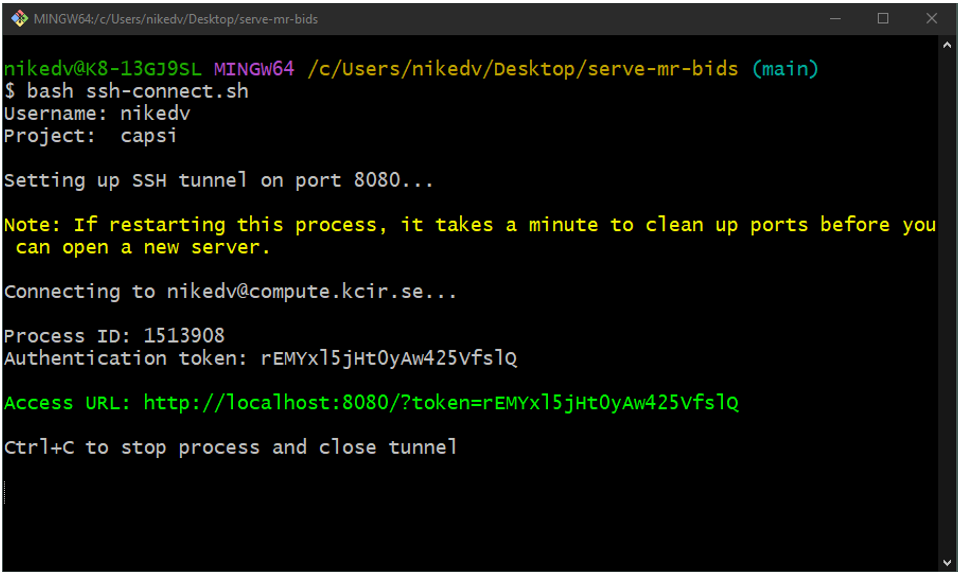
What it looks like when user nikedv connects to project capsi using an SSH key for authentication.
Modality specific processing.
Now that you have the interface set up - see the respective pages for the different modalities available for BIDSification, dependning on what data is available in your project.
- MRI to BIDS
- PET to BIDS
- MEG to BIDS (coming soon)
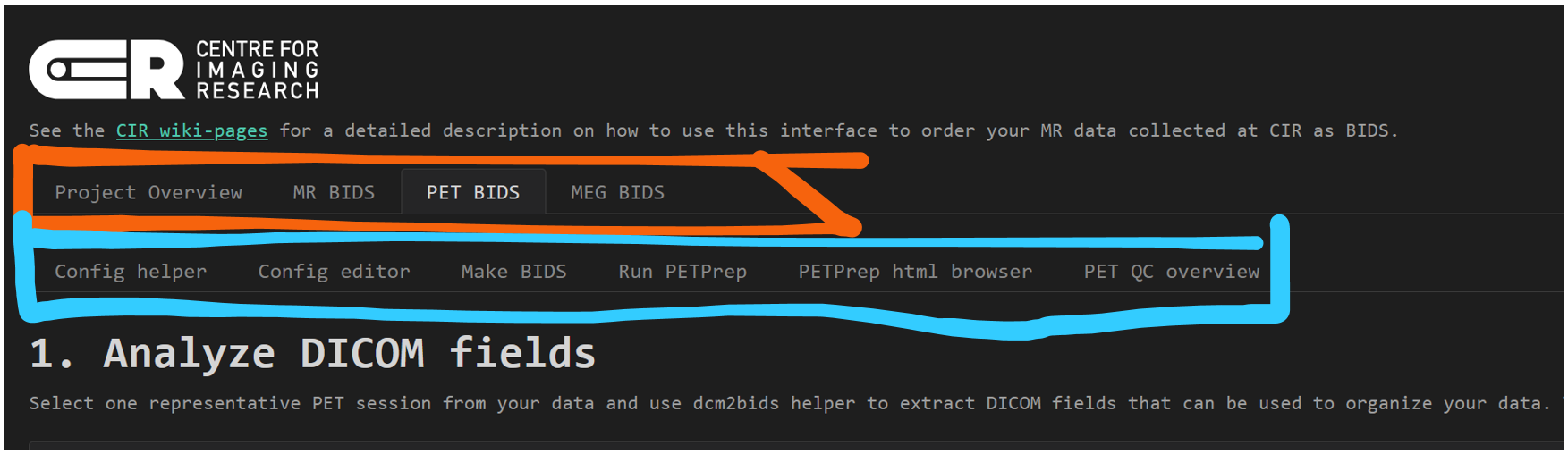
Depending on what data is available in your project, different tabs will be available in the interface. In the image is an example from the CAPSI project, that has MRI, PET and MEG data (orange). Each modality tab has a number of sub-tabs for different processing steps, in the image PET processing is selected (blue).