SESHAT
 Scripts for Extraction, Synchronisation, HPI + Analog alignment and Transfer
SESHAT is the NatMEG MEG/EEG preprocessing pipeline. It copies raw data from the acquisition computers, adds HPI coregistration for OPM-MEG, synchronizes processed data to the CIR server, and generates HTML reports. It is used through a GUI or, equivalently, through the seshat command line tool.
Full documentation
This page only covers the essentials for day-to-day use. For installation details, the complete CLI reference, pipeline internals, and developer documentation, see the source repository: k-CIR/SESHAT and its docs folder.
Pipeline stages
Each seshat run executes the stages enabled in the RUN section of the config, in this order:
- Copy raw data – copies project data from the lab computers (SQUID/OPM systems) to the central processing computer, ensuring a consistent project structure.
- OPM preprocessing – adds HPI coregistration to OPM-MEG recordings using Polhemus digitization and renames analog channels. More details here
- Sync to server – synchronizes processed data to the SPICE server, with filtering and optional deletion of remote files not present in the source.
- BIDS – is done on the SPICE server via an ssh tunnel See BIDS
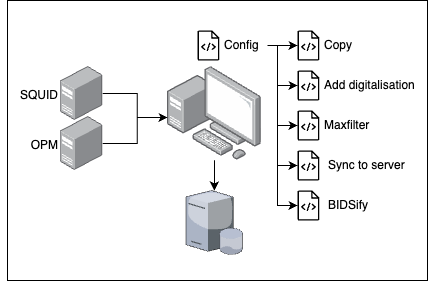
Pipeline overview showing the main components and data flow.
Using the GUI
The GUI is the recommended way to configure and run the pipeline.
seshat gui
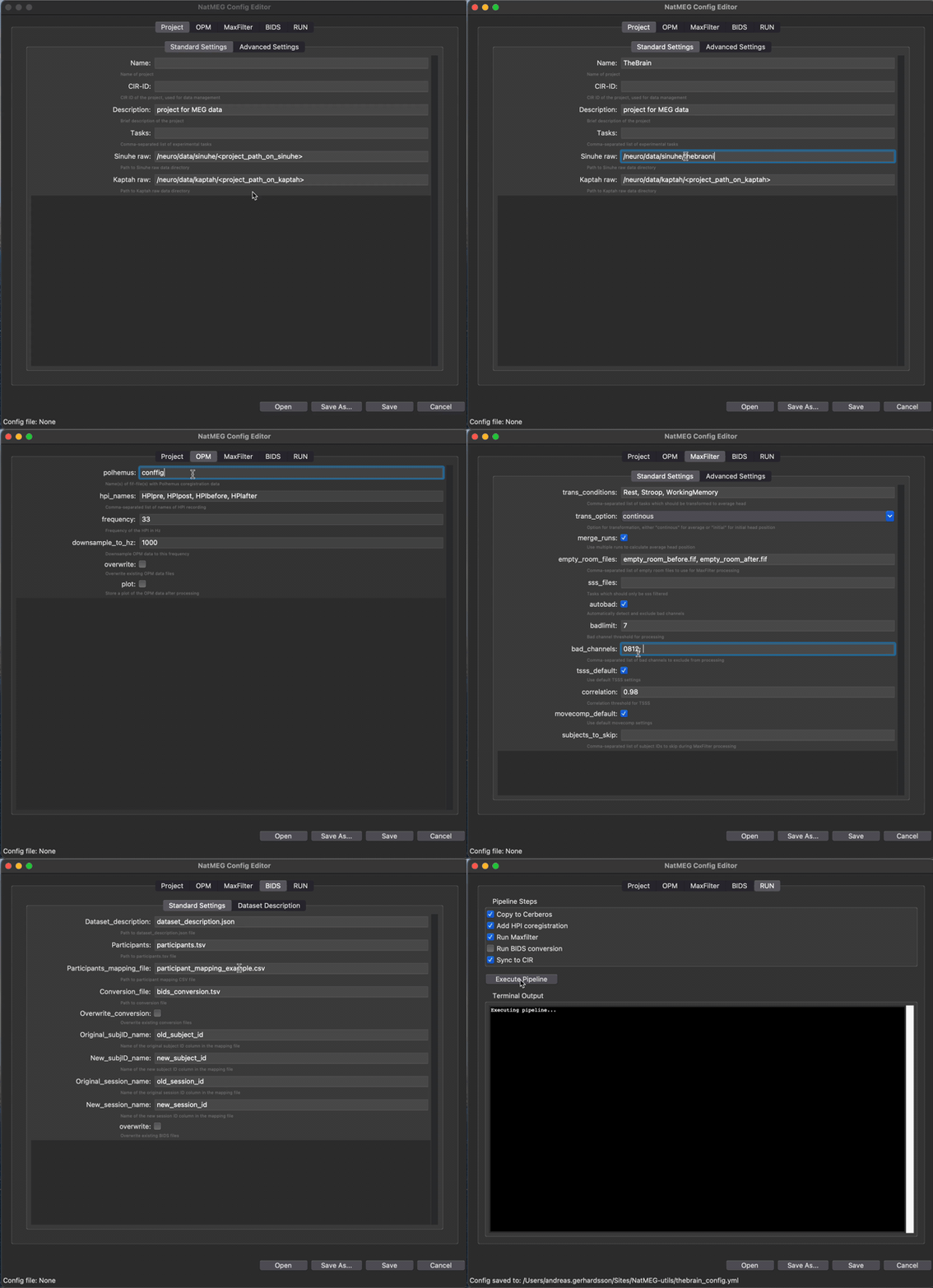
Configuration GUI for setting up and running the NatMEG pipeline.
The GUI loads a default configuration file (or one you point it to), lets you edit every setting below, and runs the selected pipeline stages without needing to touch a config file by hand.
Configuration sections
General project paths and information. Make sure to set the correct paths for your data storage locations.
- If using the GUI, Project Name and Root will update the Raw and BIDS paths automatically if not manually changed.
- Calibration and Crosstalk paths refer to the in-project copies of these files; the original locations are set during the copy stage. These are used for BIDS conversion and MaxFilter processing.
- Since project names can differ between Sinuhe/Kaptah and local storage, set the correct paths for your project on both systems by replacing the placeholders.
Project:
  Name: '',
  cir_id: '',
  InstitutionName: 'Karolinska Institutet',
  InstitutionAddress: 'Nobels vag 9, 171 77, Stockholm, Sweden',
  InstitutionDepartmentName: 'Department of Clinical Neuroscience (CNS)',
  Description: 'project for MEG data',
  Tasks:
  - '',
  sinuhe_raw: '/neuro/data/sinuhe/<project_path_on_sinuhe>',
  kaptah_raw: '/neuro/data/kaptah/<project_path_on_kaptah>',
  stimulus:   '/neuro/data/stimulus/<project_path_on_stimulus>',
  Polhemus:   '/neuro/data/polhemus/<project>',
  Root: default_path,
  Raw:  f'{default_path}/<project>/raw',
  BIDS: f'{default_path}/<project>/BIDS',
  Calibration: f'{default_path}/<project>/triux_files/sss/sss_cal.dat',
  Crosstalk:   f'{default_path}/<project>/triux_files/ctc/ct_sparse.fif',
  logfile: 'pipeline_log.log'
Settings for OPM-MEG HPI coregistration using Polhemus digitization.
OPM:
  rename_analog_channels: true
  polhemus:
  - ''
  hpi_names:
  - HPIpre
  - HPIpost
  - HPIbefore
  - HPIafter
  frequency: 33
  downsample_to_hz: 1000
  noise_reffile: ''
  overwrite: false
  plot: false
The stages to include when running the pipeline. Toggle between true/false in the GUI (or the config file) to include/exclude each step.
RUN:
  Copy to Cerberos: true
  Add HPI coregistration: true
  Sync to CIR: true
Once the configuration looks right, save it from the GUI and start the run from the same window, or run it from the command line as shown below.
Using the CLI
The seshat command exposes the same functionality as the GUI, useful for scripting or headless machines.
MaxFilter processing (legacy, CLI only) – applies SSS/tSSS to TRIUX/SQUID data. See MaxFilter.
# Create a configuration file
seshat create-config --output my_config.yml

# Run the full pipeline
seshat run --config config.yml
seshat run --config config.yml --dry-run     # preview without execution
seshat run --config config.yml --no-report   # skip final HTML report

# Run individual stages
seshat copy --config config.yml              # data synchronization only
seshat opm-preprocess --config config.yml    # HPI coregistration only
seshat maxfilter --config config.yml         # legacy MaxFilter (CLI only)

# Sync processed data to a server
seshat sync --create-config
seshat sync --server-config servers.yml --test
seshat sync --directory /data/project
seshat sync --directory /data/project --delete

# Generate an HTML report
seshat report --config config.yml

# Help
seshat --help
seshat run --help
Quick installation
Install SESHAT once per machine, then use the GUI or CLI to run the pipeline.
git clone --recurse-submodules git@github.com:k-CIR/SESHAT.git
cd SESHAT
bash install.sh
This installs a global seshat command for your user account (no sudo, conda, or manual virtual environment required). Open a new terminal afterwards and confirm it works with seshat --help. Full prerequisites and troubleshooting are in docs/installation.md.
The natmeg command still works as a deprecated alias for seshat.
Further reading
For installation on other platforms, full CLI reference, and developer documentation, see the SESHAT repository: